How to run an anonymous live Q&A at your next all-hands
A step-by-step guide to running anonymous Q&A with upvoting at town halls and all-hands meetings, so leadership hears what actually matters.
ChimeIn team7 min read
Every all-hands has the same awkward moment. A senior leader finishes their update, says “Any questions?”, and waits through ten seconds of silence. A few brave hands go up, and the questions tend to be safe ones: “When does the new office open?” or “Will we get more swag?”
The real questions — about strategy changes, layoff rumors, pay gaps, or a struggling product — stay unasked. People don’t want to be the one who puts their name to a tough question in front of 200 colleagues and their boss’s boss.
Anonymous live Q&A solves this. People submit questions from their phones without their name attached, the audience upvotes the questions they care about, and leadership answers from the top of the list. The result: honest questions, clear priorities, and a room that actually trusts the process.
This guide walks through setting up anonymous Q&A for your next all-hands or town hall, from the days before the meeting to the follow-up afterward.
Why anonymous Q&A changes the room
Before the how, it helps to understand why open mic Q&A fails and what anonymity fixes:
- Fear of judgment. In a public setting, people self-censor. A mid-level engineer won’t ask the VP of Product why a launch was delayed if their manager is watching. Remove the name, and the question gets asked.
- The loudest voice wins. Open Q&A rewards confidence, not importance. The same three extroverts ask questions every time, while the rest of the room stays quiet. Anonymous Q&A with upvoting lets everyone participate equally.
- Leadership gets filtered information. When questions are safe, leaders hear what they want to hear. Anonymous submissions surface the real concerns — the ones that keep people up at night and drive attrition.
- Remote attendees get shut out. In hybrid all-hands, the people in the room have a natural advantage for catching the speaker’s eye. A digital Q&A board puts remote and in-person attendees on the same footing.
Before the meeting: set up for success
1. Open the Q&A board early
Don’t wait until the meeting starts. Share the Q&A link 48 to 72 hours before the all-hands. This gives people time to think carefully about their questions rather than typing under pressure in the moment.
Early collection also gives leadership time to look up data, check with legal, or prepare a thoughtful answer rather than improvising on the spot.
2. Seed the first few questions
An empty Q&A board creates a bystander effect — nobody wants to be first. Break the ice by seeding two or three genuine, mid-difficulty questions yourself. These aren’t softball plants. They’re real questions that model the right tone:
- “What’s the timeline for deciding on the hybrid work policy for next year?”
- “How is the team planning to address the feedback from the last engagement survey?”
- “Can leadership share more detail on how the restructuring will affect our team’s roadmap?”
Once people see that hard questions are welcome and the board isn’t empty, they start contributing.
3. Assign a moderator who isn’t the one answering
The person answering questions (typically the CEO, VP, or department head) should not be the one filtering them on screen. Assign a neutral moderator — an internal comms lead, a People Ops partner, or a trusted senior IC — who:
- Groups duplicate questions into a single thread.
- Reframes hostile tone while preserving the core concern (“Why is management completely destroying our roadmap?” becomes “There’s a theme here about the speed of roadmap changes — let’s address it”).
- Flags questions that cannot be answered publicly due to legal or competitive constraints, so the speaker can explain why rather than dodging.
4. Flip the agenda: less monologue, more Q&A
The classic all-hands mistake is spending 50 minutes on executive updates and leaving 10 minutes for questions at the end, when half the room has already dropped off.
Flip the ratio. Aim for a 50/50 or 60/40 split between updates and Q&A. Keep the executive portion focused on three things:
- What we accomplished since the last all-hands.
- Where we missed the mark and what we learned.
- What’s coming next.
Then hand the rest of the meeting to the audience’s questions.
During the meeting: run the Q&A live
5. Show the Q&A board on the big screen
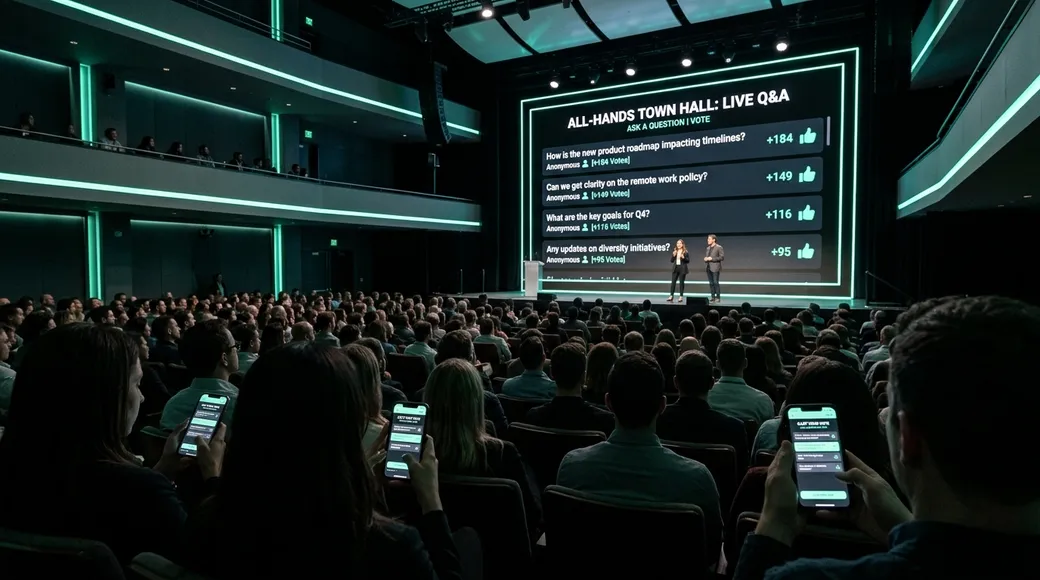
Put the question board up where everyone can see it — on the projector, the conference room TV, or the shared screen in Zoom or Teams. Seeing the questions appear and votes tick up in real time creates energy and keeps people engaged.
With ChimeIn’s live Q&A, questions appear on screen as they come in, and vote counts update live. You can sort by most popular to answer what the room cares about most, or by newest to keep up with the conversation.
6. Keep submissions open throughout
Don’t close the Q&A when you start answering. A comment from leadership mid-meeting often sparks a follow-up question that people want to ask immediately. Keep the board open the entire time.
This also means latecomers — especially in global companies spanning time zones — can still participate even if they join 15 minutes in.
7. Highlight the question you’re answering
When working through the queue, highlight the current question on screen so everyone — in the room, on Zoom, or watching a recording later — knows exactly what’s being addressed. This is especially important for hybrid meetings where remote attendees can’t read body language.
8. Embrace the tough questions
This is where trust is built or broken. When an anonymous question targets a sensitive topic — layoffs, compensation, a controversial pivot — don’t dodge it.
Three approaches that work:
- Answer directly. “Yes, we’re evaluating team sizes in Q1. Here’s our process and timeline.” Transparency, even when the news is hard, earns respect.
- Explain why you can’t answer. “I can’t share details on that acquisition because of NDA constraints, but here’s what I can tell you.” People accept boundaries when they understand the reason.
- Commit to following up. “I don’t have that number right now. I’ll get it and share it in our follow-up Slack post by Friday.” Then actually do it.
The one approach that destroys trust: ignoring the question or giving a vague non-answer. Everyone in the room notices.
After the meeting: close the loop
The all-hands doesn’t end when the call drops. The follow-up is where trust compounds or evaporates.
9. Publish answers to remaining questions
In a 60-minute all-hands, you’ll rarely get through every question. Export the unanswered high-voted questions and publish a written Q&A summary within 48 hours — in Slack, Teams, email, or your internal wiki.
This tells people: “We saw your question, we took it seriously, and here’s the answer.” It also reaches colleagues who couldn’t attend live.
10. Track and report on action items
If a question led to a commitment — “We’ll revisit the remote stipend policy” or “We’ll share the updated org chart by end of month” — track it. Report progress at the next all-hands.
When employees see that their anonymous questions actually changed something, participation in the next Q&A goes up dramatically. You’ve turned the all-hands from a one-way broadcast into a feedback loop.
Running anonymous Q&A with ChimeIn
ChimeIn’s live Q&A is built for exactly this workflow:
- Create a session and turn on Q&A. You can run it alongside live polls in the same session — start with an icebreaker poll, then switch to Q&A.
- Share the join code on screen or send the link in Slack before the meeting. Participants open joinchimein.com on their phone and they’re in — no app, no account, no login.
- Questions are anonymous by default. People can optionally add their name, but they don’t have to.
- Upvoting surfaces what matters. Sort by popular to answer the top questions first, or by newest to keep up with the flow.
- Highlight the question you’re on so remote attendees can follow along.
The free plan supports up to 100 participants per session with up to 100 questions. For larger all-hands, contact us for a custom plan.
A checklist for your next all-hands Q&A
Use this as a quick reference for your next meeting:
- Open the Q&A board 48–72 hours before the meeting
- Seed 2–3 genuine questions to break the ice
- Assign a moderator who isn’t the speaker
- Plan a 50/50 split between updates and Q&A
- Display the Q&A board on the big screen during the meeting
- Keep submissions open throughout
- Highlight each question as you answer it
- Answer tough questions directly or explain why you can’t
- Publish a written follow-up with remaining answers within 48 hours
- Track action items and report back at the next all-hands
Ready to try it? Create a free ChimeIn account and set up your first anonymous Q&A session in minutes. Or book a demo if you’d like a walkthrough for your team.